
How to Fix 3D Printer Warping | A Cause-by-Cause Approach
I once printed a box in ABS near a window during winter, and all four corners lifted 1-2mm before the print failed entirely. Then I threw together a simple cardboard enclosure, and the warping practically vanished from that run onward. It taught me that warping is not about the material alone -- if you isolate causes in the right order, it is a very controllable problem. This article is for anyone who wants to quickly diagnose FDM warping -- corners lifting, the bottom bowing, or mid-print detachment. It walks through five steps in the order you should actually try them. Working through bed cleaning, first-layer tuning, bed temperature, cooling, and brims in that sequence will narrow down most causes. Material-specific temperature and cooling guidelines for PLA, ABS, and PETG are included, along with a 30-minute single-variable test plan to build adjustments that stick.
What Is 3D Printer Warping? Identifying the Symptoms First
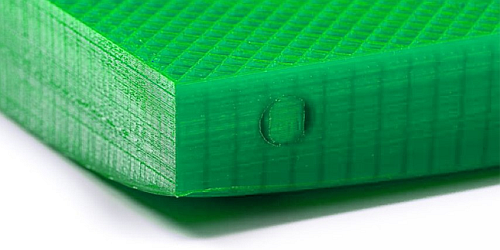
"Warping" in 3D printing refers to corners or flat surfaces lifting -- or a nominally flat bottom bowing slightly -- during or after a print. The most common case is corners peeling up, but that is far from the only form it takes. A print can look fine from above, yet flip it over and the bottom is subtly domed. I printed a thin PLA tray once that appeared normal from the top, but the underside had a slight crown in the center. That was the moment I realized warping is not limited to dramatic corner curling.
In FDM, the root cause is simple: plastic shrinks as it cools. Molten filament exits the nozzle and solidifies on the bed or the layer below, contracting as it loses heat. When different areas cool at different rates, uneven shrinkage creates residual tension inside the part. This internal stress pulls upward at corners and long edges -- what we call warping. Nature3D's breakdown of FDM warping centers on exactly this mechanism of thermal contraction and internal stress. Large flat surfaces, elongated shapes, and sharp-cornered box geometries are especially vulnerable because the stress has fewer paths to dissipate.
SLA and resin printing can produce warping too, but the mechanism is different. Instead of high-temperature cooling shrinkage, resin parts warp through cure shrinkage and distortions introduced during washing and post-curing. Resin printing looks more precise because it does not melt and stack material, yet part orientation, cross-sectional area, incomplete drying after washing, and post-cure conditions can all bend flat or thin-walled sections. i-MAKER's guide to resin printing lays out this distinction quite clearly. The key takeaway: do not assume FDM warping and resin warping share the same causes.
Identifying Symptom Types
The first thing to figure out is where, when, and in what shape the lifting occurred. Warping tends to get lumped together, but the patterns differ in ways that matter.
The most typical pattern is corners lifting. Box shapes, trays, and rectangular plates are prime candidates. The early layers may look fine, but as layers stack up, corners gradually rise until the nozzle clips them, producing scraping marks or strange noises. ABS is particularly prone to this -- even with proper bed temperature, a draft across the build area can bring it right back.
Next most common: both ends of a long edge lifting. Elongated enclosures, ruler-like parts, and long plates show this behavior. The length gives shrinkage more leverage at the extremities, so the ends curl rather than the center. Longer parts are at a greater disadvantage not because of area alone, but because the force lifting each end becomes mechanically more effective.
A third pattern is mid-print detachment from the bed. The first layer held, but partway through, one side lifts and the entire model shifts into failure. This looks like an adhesion catastrophe, but the starting point is often warping: a corner lifts slightly, the nozzle catches it, it peels further, and bed adhesion loses the tug-of-war. What appears to be a sudden detachment frequently traces back to thermal shrinkage warping.
Keeping these three patterns in mind -- corners lifting, long-edge curling, and mid-print detachment -- makes it much faster to decide whether the priority is improving bed adhesion or stabilizing the thermal environment.
💡 Tip
Warping is not limited to dramatic corner curling. A finished print that wobbles slightly on a flat surface, or a bottom with a subtle bow in the center, falls within the warping spectrum.
Warping vs. Dimensional Inaccuracy vs. Layer Splitting
Several related defects are easy to confuse with warping. Separating them keeps your troubleshooting on track.
Dimensional inaccuracy means the part is uniformly too large, too small, or holes are the wrong diameter. Warping makes surfaces curve or corners lift; dimensional inaccuracy means the part is straight but not at the intended size. A 20mm test cube measuring 19.7mm is a dimensional error. The same cube with its corners peeling up is warping. Both can appear together, but they are not the same issue.
Layer splitting is a crack that runs along the layer lines, most visible in tall ABS parts or thin-walled enclosures. Temperature drops and cooling are factors here too, so the root cause overlaps partly with warping. The difference: warping peels up from the bed surface, while layer splitting is an adhesion failure between layers partway up the print. Visually, the location of the failure makes them easy to distinguish in photos.
Full detachment is the entire model coming off the bed. If it happens from the very first layer, pure adhesion failure is the likely explanation. If the print ran for a while before separating, warping-induced mid-print detachment is worth investigating -- the sequence described earlier where a small corner lift escalates into full separation.
A useful mental model: if a flat surface lifts, it is warping. If the overall size is off, it is dimensional error. If layers crack horizontally, it is layer splitting. If the whole base releases, it is detachment. Real-world failures often combine several of these, so tracing where the failure started is the most productive first step.
Mini Glossary
A few terms come up repeatedly when discussing warping fixes. Aligning on definitions here saves confusion when reading slicer settings or other guides.
A brim is a thin flat extension printed around the perimeter of your model. It widens the contact area on the bed, making corners much less likely to lift. Brims are especially effective on box shapes and elongated parts, and they are one of the most basic anti-warping tools available in any slicer.
A raft is a base structure printed underneath the model. Instead of placing the part directly on the bed, the slicer builds a raft first and prints the model on top of it. Rafts improve adhesion at the cost of a rougher bottom surface, more material, and longer print times. Think of a raft as the heavy-duty option when a brim is not enough.
An enclosure is a box or cover that surrounds the printer to block outside air. ABS users feel the benefit most strongly -- shielding the build area from drafts and cold air reduces the temperature swings that drive warping. This does not have to be a commercial unit; even a makeshift cardboard-and-plastic-sheet enclosure shifts results noticeably. Warping is not determined by material properties alone -- managing the thermal environment makes a substantial difference.
These three -- brim, raft, and enclosure -- are tools and settings that create conditions where warping is less likely to start, rather than altering the model itself. Knowing what they do makes slicer screens far easier to navigate.
Main Causes of Warping | Thermal Contraction, Temperature Variation, Geometry, Material, and Environment
Thermal Contraction and Internal Stress Basics
The starting point of FDM warping is straightforward: molten plastic shrinks as it cools. Filament exits the nozzle at high temperature, and as it cools on the bed or previous layers, its volume decreases. The complication is that the material cannot always shrink freely. The first layer is bonded to the bed and cannot simply contract in place. That locked-in shrinkage becomes internal stress.
Internal stress does not distribute evenly across a flat surface. The center is constrained by surrounding material, while corners and edges have less restraint -- so that is where the upward force concentrates, and corners are the first to lift. This is exactly why box shapes curl at the corners first. Nature3D's explanation describes FDM warping in terms of cooling contraction and internal stress, and it maps directly onto real failures. When a print that adhered well initially starts lifting at the corners a few layers in, the issue is not weak adhesion per se -- it is accumulated shrinkage stress finally exceeding the adhesion force.
Material properties amplify this. ABS has a relatively high shrinkage rate, around 0.7%, which makes it considerably more warp-prone than PLA. Polycarbonate can exceed 1%, making it even more demanding. PLA is comparatively stable and forgiving, with milder warping tendencies. PETG sits between ABS and PLA -- not as extreme, but sensitive to bed surface compatibility, tending to grip well when conditions match and lift at the edges when they do not. In my experience, warping is better understood not as a measure of material "strength" but as a function of how much a material shrinks and how constrained that shrinkage is.
3Dプリンタで反りはなぜ起こる?(FDM)
FDM式の3Dプリンタで悩ましい問題のひとつが「反り」です。何時間もかけて途中までうまくいったのに、ベッドからぺりっとはがれて造形が台無しになったという経験は誰もがお持ちかと思います。対策はいくつも提...
nature3d.netWhy Geometry Matters
The same material can warp or not depending on the shape. The most unfavorable features are long edges, large flat surfaces, sharp corners, and thin walls. These geometries convert shrinkage forces into upward bending at edges and corners more efficiently.
Long shapes are problematic not merely because of area. As length increases, the bending moment that lifts the ends grows. Picture a ruler-shaped part: residual shrinkage near the center translates into a force that curls both tips upward. A short part with the same width may hold just fine, but stretch the length and the ends suddenly lift. Nature3D illustrates this same principle, and I have encountered it repeatedly with elongated plates and enclosure side panels.
Large flat surfaces are also warp-prone. A wide base seems advantageous because of the contact area, but the total shrinkage volume scales with it. The moment any temperature differential appears across that surface, stress concentrates at the corners and long edges. Thin trays and lid shapes are the classic examples -- deceptively simple geometry that is surprisingly tricky to print flat.
Sharp corners concentrate stress because there is no curvature to spread the load. A 90-degree corner becomes a natural starting point for lift-off. Thin-walled parts compound the issue because they lack the stiffness to resist even small shrinkage forces. Thick walls can absorb some internal stress without visible deformation, but thin panels and shells simply bend. The warping-prone models share two traits: they shrink a lot, and they flex easily under that shrinkage.
💡 Tip
Warping does not happen only because the contact area is too small. Even large contact areas can warp when the part has long edges, large flat surfaces, or thin walls -- shrinkage forces act on the edges regardless.
Temperature Variation, Drafts, and Rapid Cooling
Among the factors that make warping worse, temperature variation, ambient drafts, and localized rapid cooling are hard to ignore. When one section of the print cools faster than the rest, that area contracts ahead of the others, creating uneven internal stress that lifts edges and corners. Excessive part-cooling fan, a breeze from a window or AC unit, lower temperature at the bed periphery -- all push in the same direction.
Warping is therefore less about a single wrong setting and more about uneven heat dissipation. Depending on the material and process, even a few degrees of temperature difference across the build surface can produce measurable shrinkage differentials, though the exact threshold varies by material and setup. Large flat surfaces and thin-walled parts are especially sensitive to rapid cooling and localized temperature gradients. An enclosure works not simply because it raises the temperature, but because it evens out the cooling rate and reduces both sudden chilling and localized hot or cold spots.
Diagnosing the Symptom and Identifying the Cause
Diagnostic Flowchart
Troubleshooting warping goes faster when you classify severity first, then work through possible causes in a fixed order, rather than trying random fixes. I categorize into three levels: mild, moderate, and severe. Mild means corner lift under 0.5mm and the print completes. Moderate means visible lifting at corners or long edges, with the bottom no longer flat. Severe means mid-print detachment, or distortion dragged across 10+ layers -- at that stage, the entire thermal balance has broken down, not just adhesion.
A fixed diagnostic order eliminates guesswork. I always check first-layer adhesion, bed temperature, cooling, geometry, material, environment, and hardware condition -- in that sequence. Earlier items in the list are more reproducible and faster to confirm or rule out.
- Is first-layer adhesion adequate?
If the first layer is uniformly squished, lines connect, and corners are not thinning out prematurely, the answer is yes. If lines are round on top, break at corners, or edges look suspect before you even touch them, the answer is no -- and top priority is Z offset or bed surface condition.
- Is bed temperature correct for the material?
For PLA, the target range is roughly 60 degrees C. For ABS, 90-110 degrees C is the baseline, with a nozzle temperature of 230-250 degrees C -- going too low on the nozzle with ABS degrades inter-layer bonding and promotes warping. If settings are outside these ranges, or if there is a noticeable temperature difference between the center and edges of the bed, the answer is no.
- Is cooling too aggressive on the initial layers?
Running the fan hard from layer one lets corners shrink and lift before the rest of the base locks in. Prusa Knowledge Base recommends omitting cooling for the first few layers, and this aligns with common practice. If the answer is no, revisit initial-layer fan settings. In my own experience, corners lifting while the brim stays firmly attached has been caused by initial-layer cooling more often than anything else. Turning off the initial-layer fan in PrusaSlicer stopped the same model's corner lift on multiple occasions. When the brim is intact but the part itself peels, suspect how the cooling air hits the print before suspecting adhesion.
- Is the geometry warp-prone?
Long edges, large flat surfaces, sharp corners, thin walls -- if the model has several of these features, the answer is yes. When both ends of a long edge lift simultaneously, this step alone narrows the diagnosis considerably.
- Is the material high-shrinkage?
Conditions that work fine for PLA can fail instantly with ABS. ABS shrinks substantially, and polycarbonate even more so. If warping appeared right after switching materials, the answer is yes.
- Is there rapid cooling from the environment?
AC airflow, a window, a doorway with foot traffic -- these are classic warping conditions. If the same corner fails every time, suspect wind direction before touching any slicer settings.
- Is there a hardware issue?
Bed temperature distribution, surface flatness, nozzle contamination, sensor offset. If the same spot always lifts and nothing else changes the location, the cause is likely on the hardware side.
Following this order prevents jumping to conclusions like "the adhesive is too weak" or "the material is bad." Mild warping in particular is often resolved at step 1 or 3. Geometry and environment only become the dominant factor at moderate severity and above.
Reading Failure Photos
Warping can look similar across different root causes, but the pattern of lifting narrows things down significantly. When looking at a failed print, focus on where, when, and in what shape the lifting occurred.
| What You See | Suspect Cause |
|---|---|
| Only corners lifting | Bed adhesion deficit, or rapid cooling of initial layers |
| Corners lifting but brim is intact | Cooling too aggressive, draft hitting corners |
| Both ends of a long edge lifting | Geometry-driven, compounded by bed temperature variation |
| Same near-side corner fails every time | Environmental draft, or cooler bed edge |
| Entire bottom surface is bowed | Large flat-surface contraction, material-driven internal stress |
| Mid-print detachment with the model tilting | Not initial adhesion failure -- accumulated cooling shrinkage during printing |
| Distortion across 10+ lower layers | Severe thermal imbalance, material-geometry mismatch |
| SLA: entire face warps | Cure shrinkage, placement issue, insufficient drying after wash |
A photo of slightly lifted corners looks like the simplest case, yet it branches more than expected. If the first layer itself is weak, it is adhesion. If the brim is clean and only the part corners lift, I look at cooling first. Misreading this leads to a long detour of adjusting bed temperature and adhesive that does not address the actual cause.
Both ends of a long edge lifting symmetrically is a strong geometry signal. Thin boxes and plates exhibit this -- the center sticks while both ends curl. This is less about degreasing and more about shrinkage forces concentrating at the extremities. A temperature gradient between center and edges amplifies the symmetry of the lifting.
Photos of mid-print detachment are easy to misattribute to the first layer. The early layers held, but as layers accumulated, shrinkage stress eventually overpowered adhesion. ABS box shapes that suddenly crack a corner partway through the print are the classic example. Trend 3D's warping guide recommends high bed temperature, fan suppression, and enclosures as top priorities for ABS, and the failure patterns match exactly.
SLA warping looks different from FDM. A large flat surface warping gently, or a thin plate bending after post-processing, points to cure shrinkage and post-processing rather than thermal contraction. Volumetric shrinkage during curing averages 3-5%, and allowing roughly 30 minutes of air-drying after washing before moving on helps stabilize results. Thinking of resin warping as a "bed adhesion" problem will send the diagnosis in the wrong direction.
💡 Tip
When examining a failed print, look not just at where it lifted, but at where it did not. Is the center still attached? Is the brim intact? Is only one side unscathed? These answers quickly point toward adhesion, cooling, or temperature variation as the dominant factor.
Observation Checklist
Better diagnosis comes not only from post-failure photos but from what you observed during the print. I keep my list of observation points short on purpose -- fewer items means clearer correlation with causes.
- First-layer squish
- How the brim separated
- Presence of drafts
- Temperature difference between edges and center
First-layer squish is the entry point for any warping diagnosis. Lines that connect lightly with no excessive ridging establish a usable baseline. Lines that sit round mean under-squish; lines that are overflattened with rough surfaces introduce a different set of problems. Tuning other settings while this is unstable makes every subsequent diagnosis unreliable.
How the brim separated matters too. If the brim peels off with the part, that points to adhesion or temperature issues. If the part lifts but the brim stays put, the brim was not the weak link -- shrinkage stress concentrated in the part itself. This is exactly when I suspect initial-layer cooling. The visual outcome looks similar, but the boundary of separation tells you very different things about the root cause.
Drafts affect results more than most people expect. An obvious breeze is easy to spot, but when the same corner fails every print, holding a piece of paper or a thin thread near the build area during printing can reveal subtle airflow. AC output and cold air from a window never appear on the settings screen, yet they produce remarkably consistent failure patterns.
Edge-to-center temperature difference is harder to capture from photos alone, which makes direct observation especially valuable. If the center is stable but the perimeter warps, the focus should shift from the bed temperature setting itself to the distribution of heat across the surface. As discussed earlier, a temperature gradient translates directly into differential shrinkage, and it shows up most clearly as edge warping. On large plate geometries, this gradient practically dictates the severity of the warp.
Material-specific weighting of observations differs slightly. PLA tends to be stable around 60 degrees C bed temperature and is sensitive to cooling and drafts. ABS warps even at 90-110 degrees C bed temperature, so observation needs to extend beyond the first layer to the thermal behavior of the entire build volume -- shrinkage is substantial enough that it directly drives symptoms. PETG can look great on the first layer yet change behavior based on surface compatibility and how heat dissipates at the edges, so watching for differences between brim and part adhesion is particularly revealing. For resin printing, deformation during the window between washing and post-curing is the observation target -- simply checking whether the part has started bending before it is fully dry makes the diagnostic much smoother.
Cause-by-Cause Fixes | Five Steps to Try First
The Five-Step Overview
Anti-warping troubleshooting is faster when you lock in a sequence and address one variable at a time rather than adjusting several settings simultaneously. I always start with documenting the baseline. Skip this step and you cannot tell whether an improvement was real or coincidental.
Start by preparing a small test model that prints in roughly 20-30 minutes in most setups. A thin plate or a short bar works, as long as it has features that reveal corner lift or edge warping -- simple geometry with sharp corners is ideal. Then note the current settings. At minimum, record material, nozzle temperature, bed temperature, print speed, cooling, and bed surface type. Whether you are on PEI, glass, or using adhesive changes the interpretation of results.
- Clean and degrease the bed
Normalize the contact surface first. Wipe the bed with isopropyl alcohol or anhydrous ethanol to remove finger oils and dust. Temperature and fan adjustments get all the attention, but a contaminated surface makes it impossible to even evaluate first-layer quality. Before assessing adhesion, restore the surface to a known-clean state.
- Re-tune the first layer
Next, address the first layer. Fine-tune Z offset until lines are lightly squished and connected. At the same time, reduce initial-layer speed. If it is sitting at the default 50mm/s, dropping to 20-25mm/s alone can dramatically improve bed adhesion. Cura's documentation also recommends lower initial-layer speed for better build plate adhesion -- this is a high-impact, low-risk change.
- Revisit bed temperature
Only after the contact surface and first layer are sorted should you touch temperature. PLA targets roughly 60 degrees C, ABS targets 90-110 degrees C. ABS nozzle temperature should be in the 230-250 degrees C range -- going below that weakens inter-layer bonding. Technicolor and Trend 3D both use these ranges as their reference points. Adjust in 5-degree increments to keep results readable.
- Revisit the cooling fan
On warp-prone prints, too much cooling on the initial layers alone can cause failure. Keep the fan off or very low for early layers. ABS generally stays off; PLA starts low and ramps up. In my experience, when the brim holds but the part corners lift, adjusting cooling hits the mark more often than adjusting bed temperature.
- Reinforce adhesion
If the part still lifts, add brims or rafts. A 5-8mm brim is the easiest first addition. For shapes where stress concentrates at corners, placing mouse ears (corner pads) at the four corners can be very effective. Large models or ABS parts may also benefit from an enclosure -- even a makeshift one built from cardboard and clear plastic sheeting significantly reduces rapid cooling in the build area.
The critical discipline here is changing only one variable per test. Adjusting bed cleaning, Z offset, and temperature all at once makes it impossible to determine which made the difference. Warping troubleshooting is less about finding the perfect fix and more about ruling out causes in a reliable order.
💡 Tip
Test records double as a reference for reproducing successful conditions later. Record not just material name but also bed surface type (PEI or glass), whether the initial fan was off, and other details. The next time you print a similar shape, that log becomes a starting template.
Before/After Examples
In practice, steady small adjustments outperform dramatic changes. For PLA with mild corner lift, the starting condition is often a lightly wiped bed, initial-layer speed at 50mm/s, fan at normal levels, no brim. From there: degrease with IPA, tighten Z offset slightly, drop initial-layer speed to 20-25mm/s, add a brim if needed. Progressing in this order makes it clear exactly where the improvement occurred.
For ABS, the typical pre-fix state is more obviously problematic: bed temperature on the low side, fan running from the start, open-air printing on a large flat part. Bringing bed temperature into the 90-110 degrees C range, turning off the initial-layer fan, and adding an enclosure as needed transforms the behavior of the same geometry. ABS has high shrinkage -- Technicolor cites approximately 0.7% -- which means strengthening bed adhesion alone is not enough if the build volume is too cold.
One of the most noticeable improvements I have seen was increasing brim width from 5mm to 8mm on an ABS tray. It is a minor visual change, but the first-layer stability felt dramatically different. These quiet adjustments tend to be more reproducible than large temperature swings.
Another clear before/after scenario is the "brim survives but the part lifts" case. Before: bed temperature kept climbing with no improvement. After: suppressing the initial-layer fan stopped the warping. The root cause was not adhesion but localized rapid cooling concentrating shrinkage at the corners. The symptoms look similar, but the effective intervention is entirely different.
Avoiding Overcompensation
When warping appears, there is a strong temptation to throw everything at it simultaneously: raise bed temp, raise nozzle temp, kill the fan, add a brim, add a raft, apply adhesive. The impulse is understandable, but this approach buries what actually worked and invites secondary problems.
A common example is over-tightening Z offset. Trying to maximize first-layer adhesion by squishing too hard roughens the surface, creates elephant's foot, and introduces dimensional issues at the base. Slowing initial-layer speed is effective, but there is no need to simultaneously slam Z offset to an extreme. The target is lines that connect without excessive bulging.
Excessive temperature is another trap. Moving bed temperature in 5-degree increments from the baseline range is far more readable than a large jump. Overshooting can eliminate warping while introducing a saggy bottom surface or post-cooling distortion from a different shrinkage profile. On large flat parts especially, heat uniformity across the bed matters more than the absolute setting.
Cooling is not a binary choice either. ABS is straightforward -- generally off. But turning the fan completely off for PLA too can soften fine features. A better approach is reducing cooling for the initial layers only, then ramping up to normal for the rest of the print.
Brims and rafts have diminishing returns as well. Brims work, but wider brims are harder to remove and add post-processing time. I start at 5mm and expand to 8mm only if needed. This incremental approach reveals the threshold of effectiveness.
The biggest pitfall is changing multiple variables without recording any of them. Warping troubleshooting appears experience-dependent, but it is actually quite reproducible. Logging material, temperature, speed, cooling, and bed surface as a set for each test creates a reference point for the next failure. That record turns guesswork into a procedure.
Fixes -- Slicer Settings
The values and settings discussed here are practical baselines widely used across the community. Slicer item names, defaults, and behavior vary by version and profile, so consult the documentation for your specific slicer (Cura / OrcaSlicer / PrusaSlicer, etc.) for official values. The core strategy is to focus on initial-layer speed, height, width, flow, and cooling in order, rather than making large temperature changes. Below are practical procedures and commonly used reference points. Evaluating setting changes is faster with a short test piece than a full-size model. I typically use a 60x10x3mm bar placed at each corner or a 100mm square thin plate. Both reveal warping clearly and can finish in under 30 minutes in most setups, making it easy to compare results between setting changes.
Cura 5.x Setting Names and Locations
In Cura 5.x, the key initial-layer settings live under Custom settings. The one you will touch most often is Initial Layer Speed, found within the Speed group. If the initial layer is too fast, the head moves on before the filament settles onto the bed. Dropping from the default to 20-25mm/s makes a tangible difference. Ultimaker's own resources recommend lower initial-layer speed for improved build plate adhesion, and the reasoning is clear-cut.
Line width is controlled via Initial Layer Line Width. If it is sitting near the default of 100%, widening to 120% adds confidence in bed contact. This is less about simply making lines fatter and more about increasing per-line contact area to prevent corners from releasing. Models with fine bottom detail may suffer from going too wide, but as a first-pass anti-warping adjustment, this setting is easy to work with.
Height is set via Initial Layer Height. Placing it at 0.2-0.28mm helps absorb minor bed unevenness and stabilizes the first layer. If lines are still rounding on top, adjust Z offset downward in 0.02mm steps until they connect naturally, rather than making a large correction at once.
Flow is adjusted through the Flow family of settings, but in Cura it is best to get speed, height, and width right first. If initial-layer extrusion still feels light, adjust within the 95-105% range. Keeping changes small makes it easier to spot the boundary between good adhesion and elephant's foot.
Cooling: set Initial Fan Speed to 0% and ramp up gradually to the normal fan speed afterward. PLA benefits from suppressing the fan on the initial layers and then ramping up; ABS is best left at 0%. For adhesion type, select Brim under Build Plate Adhesion, with a width of 5-8mm as a starting point. Cura's settings use reasonably descriptive names, making it straightforward to target only the initial layers.
OrcaSlicer 2.x Setting Names and Locations
OrcaSlicer 2.x follows the same philosophy -- start by lowering First layer speed. In my experience, OrcaSlicer makes the effect of speed and flow changes very visible, but pushing a single setting too hard produces clear failures. I once bumped First layer flow from 98% to 105% and created elephant's foot -- chasing only the warp while increasing extrusion damaged the bottom surface first. OrcaSlicer is better served by dropping First layer speed and supporting adhesion through line width rather than through flow.
The relevant settings: speed is First layer speed, height is First layer height, flow is First layer flow. An initial-layer height of 0.2-0.28mm provides a readable baseline for bar-shaped test pieces. If the nozzle is too high, increasing flow keeps lines round instead of squished. Dial in Z offset at 0.02mm increments to get lines flat before relying on flow compensation.
Line width varies slightly in display depending on the profile, but the First layer line width equivalent pushed to 120% delivers results with fewer side effects than boosting flow. OrcaSlicer's sweet spot for mild corner lift is often just these two -- lower First layer speed and wider initial-layer line width. For light symptoms, no other changes are needed.
Cooling: set the initial-layer fan equivalent to 0% and bring it up from layer two onward. ABS stays off; PLA suppresses the first layer and ramps. Adhesion type should favor Brim at 5-8mm. Rafts have their place, but the bottom-surface quality and time penalties make them impractical as a default in OrcaSlicer too.
For verifying setting changes in OrcaSlicer, the 60x10x3mm bar at each corner test works especially well. It reveals which corner lifts first, whether the brim survives while the part does not, and whether lines are over-squished -- all within a quick print cycle. A 100mm square thin plate also works, but the bar test makes it easier to isolate speed, flow, and width effects.
PrusaSlicer 2.x Setting Names and Locations
In PrusaSlicer 2.x, the starting point for initial-layer stability is First layer speed and First layer height. Prusa's material profiles tend to reflect a consistent philosophy of easing into the first layer. PETG profiles, for instance, use a slightly reduced first-layer temperature to keep the initial contact calm, and this approach aligns well with anti-warping tuning.
Set speed to 20-25mm/s via First layer speed, and height to 0.2-0.28mm via First layer height. PrusaSlicer responds noticeably to just these two adjustments. If lines still are not connecting well, micro-adjust Z offset in 0.02mm steps until the first layer squishes uniformly. Getting physical contact right before compensating with flow avoids unintended consequences.
Line width is adjusted through First layer extrusion width (the naming convention in PrusaSlicer uses "extrusion width" more than "line width," though the function is the same). Widening to 120% improves bed grip in a predictable way. PrusaSlicer's extrusion-width concept is clean enough that initial-layer widening behaves as expected.
Flow is adjusted via a first-layer extrusion multiplier within the 95-105% range, but again, the primary levers are speed and width. Relying on flow as the main adhesion tool in PrusaSlicer leads to bottom-surface distortion before it fixes the warp. To stop warping without creating elephant's foot, First layer extrusion width is the more controllable tool.
Cooling follows the same structure: suppress on the initial layer, ramp up from layer two. Prusa's cooling philosophy explicitly prioritizes adhesion over cooling on the first few layers. ABS stays at 0%, PLA suppresses only the first layer. Adhesion type: Brim at 5-8mm. Reserve rafts for large flat surfaces that defeat every other adjustment.
PrusaSlicer test models can use the same corner bar test or 100mm square thin plate. Because Prusa profiles are already well-tuned, delta testing with simple geometry reveals the effect of setting changes more clearly than full-size models. The corner bar test is particularly good at surfacing over-tightened Z offset, excessive line width, and premature fan ramp-up.
Fixes -- Hardware Checks and Adjustments
Bed Preparation and Surface Management
One of the most overlooked warping factors is the physical condition of the bed itself, before any slicer setting is touched. Even a clean-looking first layer can fail at specific corners if the bed's flatness or surface state is off. The first thing to verify is whether mesh leveling is active and the compensation values are not extreme. Even machines with automatic bed leveling can have stale compensation maps, maps that were never refreshed after a nozzle swap, or maps that simply are not loaded at print start. This creates "center sticks, corners lift" behavior that no amount of slicer tuning will fix. Assuming auto-leveling eliminates the need for physical checks is a common point of frustration.
Bed temperature should not be evaluated solely by the displayed value. As discussed earlier, a center-to-edge temperature difference produces differential shrinkage, which translates directly into warping. On large flat parts or with high-shrinkage materials like ABS, this gradient is decisive. PLA is generally stable around 60 degrees C, while ABS targets roughly 100 degrees C with a nozzle range of 230-250 degrees C. ABS shrinks at approximately 0.7%, so heat escaping at the bed edge alone is enough to lift corners. Before questioning the temperature setting, I check whether the edges and center are heating evenly.
Surface material compatibility is worth cataloging for faster troubleshooting. Textured PEI grips well and is easy to use with PLA and PETG, but the texture that helps adhesion also traps contamination -- once dirty, it becomes unreliable fast. Smooth PEI produces clean bottom surfaces and makes first-layer squish easy to read. Glass offers excellent flatness, but degreasing lapses or temperature gradients cause center-only adhesion with the perimeter losing hold. Across all surfaces, worn spots, skin oils, old adhesive residue, filament deposits, and residual mold-release agents from manufacturing all degrade adhesion noticeably. Even if the surface looks clean, the same spot warping every time is reason enough to investigate.
Adhesives should match the surface-material combination rather than being applied reflexively. Glue stick works well for PLA. ABS slurry is effective for ABS in many cases. On PEI sheets, PEI-compatible glue applied thinly serves not only as an adhesion booster but also as a protective release layer. PETG is notable here because it can bond too aggressively to PEI, potentially damaging the sheet on removal. Using glue is not just about increasing grip -- it can also make removal safer.
One episode that cost me considerable time was a print where the exact same corner lifted every time. Z offset, cleaning, temperature -- nothing changed the behavior. The culprit turned out to be a single bed mounting screw that had loosened slightly. That corner experienced a different load during printing, and even re-running bed leveling did not compensate for the mechanical instability. Tightening the screw eliminated the problem completely. This kind of mechanical looseness cannot be fixed through settings. When the same spot fails the same way every time, check hardware fasteners before anything else.
Leveling and Z Adjustment Procedure
Z offset and bed leveling are foundational adjustments that directly affect reproducibility. If these are off, no amount of initial-layer speed or line width tuning will produce consistent results. The soundest approach is to trust auto-compensation but first minimize physical tilt as much as possible, then refine Z offset on that foundation. Leaving large corner-to-corner height differences for auto-leveling to absorb makes first-layer squish inconsistent across different areas of the bed.
The practical procedure is straightforward. Using paper or a feeler gauge, equalize the resistance at all four corners and the center. Light friction on the paper is the reference -- if all five points feel the same, the bed is close. If corners are consistent but the center is tight or loose, suspect bed bow or a mounting issue before proceeding. Then run auto-leveling and verify that compensation values are not skewed to extremes. Mesh compensation is not a cure-all; it smooths out what it can, but there are limits to what software can correct when the physical state is far off.
Z offset is about finding the sweet spot between too far and too close. Too far, and lines sit round on the surface and release at corners. Too close, and material gets pushed out sideways, roughening the surface and creating elephant's foot. The target is first-layer lines that are lightly squished with adjacent lines blending naturally -- a slight merge at the boundaries with no ridging. I pay attention not only to the center but to whether all four corners show the same line width. If the center looks perfect but corners are suddenly thin, Z offset alone is not the issue -- the bed itself is likely the source.
PETG responds particularly well to careful Z tuning. Prusa's PETG guide suggests 230 degrees C nozzle for the first layer, 240 degrees C afterward, and bed temperatures of 85 degrees C for the first layer, 90 degrees C for subsequent layers. This gentler first-layer approach makes Z offset easier to dial in, because the first layer behaves calmly enough to distinguish between under-squish and surface incompatibility. Chasing the fix through temperature alone is less productive than getting the physical contact right first.
💡 Tip
After leveling, verify with short bars placed at the four corners rather than the production model. Checking whether squish is consistent across corners and center quickly separates Z-offset problems from bed-flatness problems.
Draft Control and Enclosures
On the hardware side, managing airflow is one of the most effective warping interventions. Corners lifting, brim surviving while the part peels, the same side failing every print -- these symptoms often come down to where cold air hits the part during printing, not nozzle or bed temperature. ABS is particularly susceptible because its high shrinkage turns any localized rapid cooling directly into deformation. Materials like polycarbonate, where shrinkage can exceed 1%, make thermal uniformity even more critical.
Start with the part-cooling fan duct. If the duct angles slightly too low or blows unevenly, one side cools faster. PLA needs some cooling, but on the initial layers and warp-prone shapes, too much airflow at the wrong angle defeats adhesion. ABS should have the fan suppressed as much as possible, restricting it to situations where geometry absolutely requires it. Beyond the fan setting, check the duct direction, housing gaps, and airflow patterns near the nozzle.
External drafts also matter. Near a window, in the path of an HVAC vent, or beside a frequently opened door, one side of the print consistently cools faster. Even with adequate bed temperature, cold air hitting the side of the print accelerates shrinkage on that face. When troubleshooting persistent warping, I sometimes check for airflow at print height by holding my hand near the build area during a print. What feels like a still room at desk height may have a subtle draft at the height of the build.
A simple enclosure addresses all of this at once. It does not need to be an expensive commercial unit. Cardboard or insulation panels around the printer, with an accessible front panel, reduce temperature fluctuation in the build area substantially. The goal is not full sealing but preventing direct outdoor air contact. For ABS box shapes and large flat parts, this single change often determines whether corners hold. I have had multiple instances where settings that refused to stop warping suddenly worked the moment an enclosure went up. In those cases, the hardware-side fix outperformed any slicer adjustment.
When using an enclosure, keep combustible materials away from heat sources, leave some ventilation at the top or back, and ensure wiring and spool movement are not obstructed. The point of an enclosure for anti-warping purposes is draft prevention, not high-temperature operation. If corner lift is caused by airflow and temperature gradients rather than material limits, this adjustment alone can transform your results.
Fixes -- Material and Environment Improvements
Filament Drying and Storage
When the filament itself is compromised, no amount of slicer tuning or bed leveling fully eliminates warping tendencies. ABS and PETG are particularly sensitive to moisture absorption, and even when the filament looks normal, extrusion can become unstable and inter-layer bonding can weaken, resulting in edges and corners lifting more easily. Warping is often framed purely as a thermal-contraction issue, but the chain where "inconsistent extrusion increases internal stress" is a real contributor. I have noticed that prints with weakened layer adhesion show rougher lifting patterns not just at corners but along long edges.
Priority varies by material. PLA is relatively warp-resistant, so when it warps, drafts and insufficient contact area are the first suspects. That said, PLA still warps when exposed to rapid cooling or when the contact area is too small for the shape. ABS has high inherent shrinkage, making temperature stability the top priority, but dry filament is a prerequisite. Even with nozzle and bed temperatures in the recommended range, wet filament destabilizes extrusion and weakens the bond between the first layer and subsequent layers. PETG appears warp-resistant but is actually sensitive to both moisture and surface compatibility, so storage condition differences show up directly in print quality.
There was a rainy-season stretch where my PETG first layers refused to stabilize. Z offset, cleaning, nothing helped -- the lines kept varying in width, and edges slowly peeled. I dried the filament at about 60 degrees C for two hours and ran the same settings. The first layer was visibly calmer. After that experience, I treat PETG as a "check storage before checking settings" material. When drying alone fixes the symptom, the core issue is the filament, not the bed.
Storage effectiveness depends less on how long the spool has been open and more on whether it has been sitting in moisture-absorbing conditions. Leaving opened PETG or ABS next to the printer seems harmless in the short term, but the cost shows up later as warping, stringing, and surface roughness. A sealed container with desiccant -- enough to at least prevent active moisture uptake -- makes cause isolation much simpler.
Room Temperature, Humidity, and Airflow
Unstable air around the print means the same G-code produces different results on different days. Warping discussions tend to focus on bed temperature and fan settings, but room temperature and airflow management form the foundation for material-specific priorities. My baseline is a room temperature of roughly 20-28 degrees C without large swings. Within that band, the failure mode of "the room got cold and one side shrank" effectively goes away.
Material differences are pronounced here. PLA can tolerate rougher room conditions but still warps when placed in a rapid-cooling path or when the contact area is small. ABS is a different matter entirely -- thermal stability is the overriding priority. With a shrinkage rate around 0.7%, temperature variation during printing translates directly into deformation. Nozzle at 230-250 degrees C and bed at 90-110 degrees C still are not enough if the surrounding air is fluctuating. The enclosure discussion in the earlier section applies directly here: enclosures work because they deliver that thermal stability in one step.
Drafts do not have to be strong to cause problems. Window proximity, ventilation paths, direct AC output, and circulator airflow all correlate with warping patterns. Corner lifting, one-sided failure, brim surviving while the part peels -- all match the scenario of one face losing heat faster than the others. A room that feels calm at desk level can have a subtle air current at build height, so for ABS instability, checking the placement before the settings is the more productive sequence.
Humidity plays an indirect role. Rather than causing warping directly, it accelerates moisture absorption in PETG and ABS, destabilizing extrusion and layer bonding, which then increases warping susceptibility. Increased failure rates during the rainy season follow this chain. PLA is more tolerant, though in high summer temperatures the cooling dynamics change and first-layer spread can behave differently. The common thread across materials is that consistent room conditions make root-cause isolation far easier.
💡 Tip
If PLA warps, look at drafts and contact area first. If ABS warps, prioritize build-volume temperature stability. If PETG warps, include moisture and bed-surface compatibility in the investigation. Following this material-specific sequence keeps troubleshooting on track.
Choosing Adhesives and Bed Surfaces
The bed surface is not a "whatever sticks" decision. Depending on the material, both too little adhesion and too much adhesion are real problems. Confusing the two leads to either persistent warping or surface damage on removal. By material: PLA is generally cooperative, often adhering well on a 60-degree bed without fuss. However, small contact areas or elongated parts still warp from simple degreasing lapses or inadequate squish. For PLA warping, improving contact conditions beats adding stronger adhesives.
ABS runs on a high-temperature bed with thermal stability as the axis, so the surface material needs to hold uniformly at elevated temperature rather than grip with brute force. PEI sheets work well, staying reliable as long as the temperature is up. Glass offers flatness but lets go at the edges when heat drops off there, and surface material alone will not overcome warping on glass if the temperature gradient is present. Layering adhesive on ABS without addressing rapid cooling or temperature unevenness masks the real cause.
PETG is the trickiest material in this regard. It can under-adhere and warp at the corners, or it can over-adhere to glass and damage the surface on removal. Both failure modes exist. I find that printing PETG on glass with a thin layer of glue -- used as a release agent rather than an adhesion booster -- is more manageable than direct contact. PEI also works well for PETG, though keeping the surface state consistent prevents over-adhesion surprises.
Prusa's PETG recommendation of 230 degrees C first layer, 240 degrees C afterward, bed at 85-90 degrees C reflects the strategy of keeping the first layer calm to achieve reliable adhesion. If the surface compatibility is wrong, good temperature settings alone are not enough. The difficulty with PETG is that you need to find the right level of adhesion -- not just maximum adhesion. From a warping perspective, the selection should consider not only whether the part stays down during printing but also whether it can be removed without incident afterward.
Material-Specific Warping | What Differs Between PLA, PETG, and ABS
The first effective intervention differs substantially by material. Settings that work for PLA often fail on ABS, and heavy-duty ABS measures applied to PLA are overkill. I have printed the same box shape that succeeded in PLA, using the same G-code, in ABS -- and watched corners lift every time. Even with identical print data, what determines the outcome is shrinkage magnitude, cooling behavior, and build-volume stability.
Warping susceptibility is best understood not by comparing temperature numbers but by asking which adjustment to prioritize for each material. PLA hinges on first-layer quality and rapid-cooling prevention. PETG depends on bed-surface compatibility and first-layer stability. ABS requires sustained temperature control throughout the entire print. The larger and sharper the geometry, the more these differences are amplified. ABS shrinks at approximately 0.7%, and polycarbonate can exceed 1%, so when material conditions alone are insufficient, design modifications -- rounding corners, expanding contact area -- become practical complements.
PLA Tips
PLA is the least warp-prone FDM material, which makes it useful as a diagnostic baseline: if PLA warps, there is likely a significant underlying issue. A bed temperature around 60 degrees C is sufficient in most cases, and the priority is getting the first layer and contact conditions right.
However, "less warp-prone" and "warp-proof" are different things. PLA fails when rapid cooling combines with insufficient contact area. Models standing on small feet, thin elongated plates, shapes supported only at their corners -- all concentrate stress at the base more than the geometry suggests. Add cold air from a window or aggressive fan placement, and corners lift even with PLA. Reducing the initial-layer fan in particular makes a notable difference. PLA is a material where how the first few layers land largely determines the outcome.
When PLA warps, increasing contact area, adding a brim, and adjusting initial-layer cooling are more productive than shifting bed temperature by large amounts. PLA warping is better addressed by preventing rapid cooling and stabilizing the first layer than by trying to hold the part down with heat.
PETG Considerations
PETG sits between PLA and ABS in thermal behavior and is not as aggressively warp-prone as ABS, but first-layer instability makes it difficult fast. The challenge is that both under-adhesion and over-adhesion are possible. Optimizing purely for warp resistance by maximizing grip is not always the right answer with PETG.
One common pattern: nozzle or bed temperature set too high softens the first layer excessively, causing inconsistent line width and unstable edges. Another: bed surface compatibility issues cause lines to slide or grip too aggressively, producing a seemingly acceptable first layer with unstable edges underneath. Prusa's PETG profile using 230 degrees C for the first layer, 240 degrees C afterward, and bed at 85-90 degrees C illustrates the approach of keeping the first layer well-behaved enough to assess.
When tuning PETG temperatures, working from the manufacturer recommendation in 5-degree increments on either nozzle or bed (one at a time) is more productive than trying to land on a fixed number. This makes it easier to distinguish overheating (first layer too soft) from underheating (lines not bonding). I pay attention not just to warping but to whether the first-layer line ends are settled and whether there is a difference between brim adhesion and part adhesion. PETG stabilizes when it reaches the right level of adhesion -- not the maximum level.
ABS Essentials
Among these three materials, ABS has the clearest priority hierarchy for warping. More important than first-layer adhesion is maintaining stable temperature throughout the print. Nozzle at 230-250 degrees C, bed at 90-110 degrees C, fan off -- that is the foundation. Introducing cooling causes layers that were deposited at high temperature to contract suddenly, lifting corners and long edges.
The differentiating factor with ABS is the enclosure. Heating only the bed while the surrounding air is cold widens the temperature gap between upper and lower layers, locking in internal stress. When I switched from PLA to ABS using the same G-code on the same printer, warping appeared on every print. The change that actually mattered was not in the slicer -- it was stabilizing the build-volume temperature and airflow. With ABS, the material's true behavior only appears once the environment is under control.
ABS shrinks at approximately 0.7%, so large box shapes and sharp-cornered plates push the limits of temperature management alone. When the geometry is demanding, design-side approaches -- fillets on corners, increasing contact area -- become practical necessities. For persistent ABS warping, the most reproducible progression is: turn off the fan, maintain high bed temperature, and stabilize the build volume with an enclosure.
Design-Based Prevention | Large Flat Parts, Elongated Shapes, and Sharp-Cornered Models
Splitting Large Surfaces and Adding Material Relief
Viewed from the design side, FDM warping originates in cooling shrinkage and the internal stress it leaves behind. Freshly deposited plastic is still soft, and as it cools, it contracts. When the rate of contraction differs between the bed-facing bottom (held down by adhesion) and the air-exposed top (cooling faster), the part tries to bend. Large flat surfaces are especially vulnerable because their area makes them sensitive to temperature gradients, drafts, and bed temperature variation. Sharp-cornered models are also at a disadvantage, with stress concentrating at the four corners and making them natural lift-off points.
Printing a large base as a single piece often causes more trouble than splitting it and bonding the parts afterward. I had a box bottom that refused to stay flat no matter the settings. Without changing the design significantly, I split it into two parts -- a U-channel and a lid. Same material, same printer, same settings, and the warping essentially disappeared. The fix was not a setting change; it was breaking up the long one-piece base so shrinkage forces operated on shorter segments. A large unbroken flat surface accumulates contraction along its entire length, but splitting it into smaller units distributes that force.
Material relief (coring out the bottom) also helps. A thick, solid base cools unevenly -- some regions lag behind others, leaving residual stress. Reducing wall thickness on the underside, or using ribs for structural support instead of solid fill, prevents stress from building up in one place. In injection molding, thick-thin transitions are well-known warping triggers, and the same logic applies to FDM: avoiding abrupt thickness changes and transitioning gradually reduces the severity of bowing. A base that is extremely thick in the center and thin at the edges is asking for trouble.
Corner treatment matters too. Right-angle corners on a rectangular plate create collision points for shrinkage vectors, and those corners become warping initiation sites. Adding a fillet or a small chamfer distributes stress away from the corner. This looks cosmetic but actually manages heat dissipation and force flow. High-shrinkage materials like ABS show the benefit most clearly, and on large flat surfaces, rounding the corners can be more effective than any slicer tweak.
💡 Tip
Warping countermeasures tend to focus on increasing adhesion, but for large flat surfaces, reducing the shrinkage force itself is often more effective. Splitting, material relief, ribs, and corner fillets are design tools for exactly this purpose.
Stress Relief for Elongated Parts
Elongated parts warp not because the contact area is small but because length gives any edge lift more bending leverage. A short part can absorb localized shrinkage without issue; a long part amplifies it like a lever, propagating distortion from one end to the other. Add uneven cooling from one side, and the asymmetric shrinkage bends the entire piece.
For these shapes, slits or grooves near the ends and corners that give shrinkage somewhere to go are an effective design strategy. When a long plate or frame warps at the corners every time, a small relief groove near each corner interrupts the stress path from end to center. Even a minor notch breaks up the continuous sheet that would otherwise pull as a single unit, changing the warping behavior noticeably. Shapes with a single unbroken long edge are especially prone because contraction accumulates along the entire run.
Corner retention can also use the mouse-ear concept -- small disc-shaped pads at the corners of the model that increase contact area only where warping initiates. This is a targeted approach: instead of fattening the entire base, you reinforce only the vulnerable spots, and removal is relatively easy. On sharp-cornered boxes or narrow covers, corner-only retention can be more practical than a full-perimeter brim.
For elongated parts, maintaining uniform wall thickness is also critical. Sections that suddenly thicken -- a boss base, a one-sided reinforcement rib, a localized infill change -- cool at different rates and create differential shrinkage. A straight bar intended to stay straight will gradually curve toward the thicker side. Anti-warping design is not about adding material everywhere for strength; it is about making force and heat flow uniform.
Infill and Wall Thickness Optimization
Internal structure has a direct relationship with warping. The beginner instinct is "if it warps, make it denser and thicker," but in FDM this can backfire. The reason is simple: more material means more thermal mass, and more cooling shrinkage and internal stress. Filling a large flat surface with high-density infill or near-solid fill can produce a beautiful top surface while the bottom bows upward.
In practice, boxes and plates sometimes warp less with moderate infill than with high infill. Marubeni's insights confirm that reducing internal density to limit shrinkage effects can be beneficial. Even when rigidity is required, achieving it through localized wall thickness and ribs rather than overall solid fill gives better control over heat accumulation and shrinkage patterns.
Here too, avoiding uneven wall thickness is key. A thin two-wall shell right next to a thick boss, or a section that is suddenly solid in the middle of a sparse part, creates a cooling-rate mismatch. A uniform 3mm plate warps less than a part with 1mm and 5mm sections side by side. When thickness must change, tapering gradually rather than stepping abruptly reduces internal stress asymmetry.
Design-based warping prevention complements slicer and hardware adjustments rather than replacing them. For large flat surfaces, elongated parts, and sharp-cornered models especially, shaping the part so shrinkage itself is gentler produces more repeatable results than relying solely on bed adhesion and temperature. When I face a model that keeps warping, my first move is not to adjust settings but to ask where stress accumulates and where bending moment originates. Once that picture is clear, splitting, grooves, fillets, ribs, and infill adjustments all connect into a coherent strategy.
SLA (Resin) Warping Considerations
Orientation
Resin-printing warping is driven not by rapid cooling alone but by shrinkage inherent in the curing process. SLA cure shrinkage averages 3-5% by volume, and this accumulates layer by layer. Shapes with large flat cross-sections or layouts that cure a wide area per layer are especially prone to distortion. Flat orientation is the classic problem: every layer cures a large surface simultaneously, stacking shrinkage in the same direction, which manifests as gradual warping after the print is complete.
The effective counter is tilting the model instead of laying it flat. Angling the part reduces the cross-sectional area per layer, preventing a large shrinkage load from landing on any single layer. I originally printed miniature bases flat, and they looked fine right off the build plate. After washing and post-curing, however, they bowed into a dish shape. Switching to roughly 45 degrees and reworking the support layout brought the post-process deformation well under control. The takeaway: post-processing shrinkage balance, not how it looks during printing, is what matters.
For large-cross-section plates, bases, and cover shapes, resist choosing flat orientation just because it looks stable on the build plate. In resin printing, the "easy to place" orientation and the "resistant to warping" orientation often do not coincide. An angle that slices the cross-section into smaller increments per layer tends to preserve flatness better.
Hollowing and Drain Holes
Whether to print solid or hollow also affects warping. More resin means more total cure shrinkage, so thick solid blocks and large flat fills carry higher internal stress. Hollowing reduces the volume of resin involved, directly lowering the shrinkage load. The benefit is most apparent on larger parts.
However, hollowing without drain holes can make things worse. Uncured resin or wash solvent trapped inside creates an imbalance during drying and post-curing -- the outside cures and contracts while the inside remains liquid. Drain holes that allow the interior to be fully emptied serve not just washability but also warping prevention.
Bases, boxes, and similar shapes where the outer shell is thin but the interior can trap liquid are particularly at risk. Even if the exterior looks perfect, trapped resin that cures later pulls against the already-cured shell, slowly distorting flat surfaces. Hollowing and drain holes should be considered as a pair, and the benefit extends beyond print-time success to whether the part stays flat after post-processing.
💡 Tip
Water-washable resin is convenient, but I find it tends to show slightly more shrinkage than standard resin. For large flat surfaces and base shapes, careful attention to orientation and drying matters even more than with conventional resin.
Washing, Drying, and Post-Curing
Resin warping frequently progresses during post-processing rather than appearing on the build plate. Prolonged soaking during washing can overexpose the surface, and moving into post-curing while still wet creates differential shrinkage between the surface and interior. Keep the wash no longer than necessary, and allow roughly 30 minutes of thorough air-drying before proceeding to the next step. This stabilizes deformation behavior noticeably.
The drying step is often underestimated, but it is a significant factor in warping control. Residual moisture or solvent causes one side to contract faster during curing, and thin discs or plate shapes are especially susceptible to dishing. My miniature bases came out flatter when I dried them properly compared to rushing straight into curing.
Post-curing method also matters. Thin or flat parts benefit from post-curing with supports still attached, which act as a holding fixture to maintain the shape. After switching to tilted orientation, I also started curing with supports in place, and the dish-shaped deformation on my bases decreased further. The urge to remove supports quickly is understandable, but for warp-prone shapes, they serve as shape-retention braces. Resin printing is one area where post-processing management can matter more than the print settings themselves.
When Nothing Else Works: Additional Checks
Re-Inspecting the Hardware and Sensors
If settings and materials have been thoroughly addressed and the warping pattern persists, it is time to suspect the hardware. The areas to investigate are bed flatness, heating uniformity, whether auto-leveling compensation is actually being applied, and frame integrity. Warping is often dismissed as "weak adhesion," but in practice, conditions varying by location on the bed can produce the same symptom without any adhesion problem.
A common trap is tuning everything under the assumption that the bed is perfectly flat. Neither glass nor metal beds are guaranteed to be level across all points. Even auto-leveling machines are not immune: mesh compensation data may not have been saved, the start G-code may not be loading the compensation, or the probe offset may have shifted. All of these mean that carefully measured bed topology is not actually applied during printing. The visible result -- "the same corner lifts every time" -- could simply mean that corner's first-layer squish is insufficient.
Heating uniformity is another value that display readings do not fully reveal. I once encountered a machine where the bed temperature readout and PID behavior appeared normal, but one edge consistently warped. A thermal image showed that the bed edge was not reaching the target temperature. The center was fine, but heat was dropping off at the perimeter. Even with a flat bed, if the outer zone is under-heated, edge shrinkage runs ahead and corners lift. A correct display temperature and uniform heating across the entire build surface are separate questions.
Bed heater failures do not always mean total failure -- they can manifest as a weaker zone, slow ramp-up on one side, or edges that never quite reach set temperature. The result: success in the center, failure at the edges on large models, one-sided warping when a long part is placed diagonally. Adhesive cannot compensate for this kind of fundamental thermal deficit.
Frame distortion is easy to miss. Large-bed machines or units that took a hard knock during shipping can develop a slight twist that is invisible to the eye. Auto-leveling cannot fully correct beyond a certain range, so nozzle height varies unpredictably and edge adhesion suffers. If warping always occurs in the same direction, checking X-gantry level and frame squareness -- not just bed surface -- can reveal the connection.
💡 Tip
On auto-leveling machines, the important question is not whether the sensor exists, but whether compensation data has been captured, saved, and loaded at print start. A gap at any step leaves the same localized first-layer problems as a manual-leveling machine.
Isolating Material Lot and Degradation Effects
If the hardware checks out but warping has suddenly gotten worse, material lot variation or degradation is worth investigating. ABS, PETG, and nylon-based filaments in particular can produce different results across lots or storage conditions, even within the same brand. Old ABS that suddenly starts warping aggressively may not respond to temperature changes -- and a fresh spool may resolve it immediately.
Moisture absorption is the most common culprit. Wet filament does not just roughen the surface; it destabilizes extrusion, causing line width and inter-layer bonding to fluctuate. Warping is usually discussed as a shrinkage issue, but in practice inconsistent extrusion creates adhesion variability that allows edges to lift. Even without visible stringing or popping sounds, a subtle loss of first-layer cohesion on a large flat surface can tip the balance.
Old ABS is a high-priority candidate for lot-based investigation. ABS is already warp-prone with high shrinkage, so degradation, moisture, and batch-to-batch formulation differences have outsized effects. Surface additive differences across lots can mean one spool adheres well to PEI while another lifts at the edges under identical conditions. In situations like this, adjusting temperature is less efficient than testing the same model with a fresh spool from a different lot.
Adhesive-surface mismatches also fall under material-related diagnostics. Some materials are stable directly on PEI, while others need glue stick, ABS slurry, or specialty adhesive for consistent results. The question is not "should I use adhesive" but "is the adhesive matched to the material?" A glue that works for PLA may not hold ABS or ASA, and PETG on certain surfaces can grip so hard that removal becomes the problem.
When ABS proved persistently unstable in my setup and no hardware issue surfaced, switching to a different manufacturer's ASA under the same conditions produced noticeably calmer warping behavior. Changing materials is not giving up -- it is a practical way to manage shrinkage characteristics. Moving from ABS to ASA, or depending on the application to PLA+, can reduce the difficulty of temperature management significantly.
Re-Evaluating the Installation Environment
When hardware and material both check out but failures continue, the installation environment itself may be the primary cause. The most commonly missed factors are drafts and nighttime temperature drops at the printer's location. A printer near an AC unit, at a window, or along a walkway where foot traffic moves air will see consistent one-sided cooling. If warping direction is the same every time, it may reflect airflow direction rather than any machine-side left-right asymmetry.
This influence is invisible in temperature readouts. Bed and nozzle temperatures read normal, yet the front edge gradually loses, or a single corner's brim peels. The enclosure discussion applies here directly: for high-shrinkage materials like ABS and ASA, the ability to maintain build-volume temperature alone changes outcomes. Even a simple enclosure reduces not just first-layer issues but mid-print rapid cooling, slowing the progression of warping.
Temperature drops also matter. Prints that succeed during the day but fail at night, or instability after the heater shuts off, point to ambient temperature changes rather than settings or material. On large flat surfaces and long parts, a cooler lower layer alters internal stress accumulation enough to make the same G-code produce different success rates.
Vibration from the print surface is another vector. Vibration does not directly warp prints, but it can subtly disrupt first-layer lines, creating uneven adhesion that becomes a warping initiation point. If edge quality degrades only on a light rack, or only along the Y-axis where the bed moves aggressively, the entry point may be mechanical vibration rather than thermal conditions.
When environment-level fixes still do not solve the problem for a particular model, shifting to a design-based solution is a practical decision. Printing a warp-prone box as a single piece is often more time-consuming overall than splitting it and bonding afterward. Like material substitution, model splitting with post-bonding is not a defeat -- it is an engineering approach to distributing shrinkage stress. For large flat surfaces and sharp-cornered geometries, this route frequently offers better repeatability.
Planning a Small Test Print
Choosing a Test Model
Jumping straight to the production model for warping troubleshooting is counterproductive, especially with large ABS surfaces. The temptation to adjust cleaning, temperature, fan, and brim all at once is strong, but the result is never knowing which change worked. I learned this the hard way, burning multiple prints on a large ABS base while changing several settings simultaneously. Each failure blurred into the next. Switching to a quick test piece and varying one thing at a time identified the root cause in half a day. The real fix turned out to be initial cooling and build-volume temperature interaction -- not bed adhesion at all.
Good test geometry is a thin plate or bar with sharp corners that finishes in 20-30 minutes. Warping shows up at corners and long edges, so a deliberately warp-prone shape exposes problems better than a round or small-footprint model. A thin rectangular plate with clear corners, or several narrow bars arranged across the bed, reveal first-layer adhesion issues, draft patterns, and left-right temperature differences. 3DBenchy is useful for general diagnostics but carries too much information for warping isolation. When the goal is measuring corner lift, the simpler the geometry, the more useful the result.
Material-specific interpretation of test pieces differs slightly. PLA is forgiving, so the test mainly validates first-layer and draft sensitivity. ABS, with its approximately 0.7% shrinkage (per Technicolor's general reference), produces pronounced corner behavior on flat test pieces. Polycarbonate, which can exceed 1%, is even more responsive. This is exactly why using a geometry that invites failure is valuable -- a shape that passes easily does not guarantee the production box or cover will also succeed.
What to observe is not just whether it detached. Which corner lifted first, whether the center held while the ends curled, whether the brim survived while the part did not -- each scenario points to a different area of investigation. One corner failing consistently suggests draft or a cooler bed edge. All four corners lifting evenly suggests material shrinkage or overall thermal imbalance.
Change-Plan Template
Warping isolation accelerates when the order of changes is fixed. The recommended sequence: clean, initial layer, temperature, cooling, brim, enclosure, design revision. Improving at one step and simultaneously touching the next buries the effective variable. Initial layer, temperature, and fan interact with each other, so limiting each test run to one variable is the most productive approach.
Recording results in a simple table is sufficient. Paper or spreadsheet -- either works, but keeping the columns consistent makes comparisons straightforward.
| Run | Variable Changed | Before / After | Result (lift height, adhesion quality) | Next Step |
|---|---|---|---|---|
| 1 | Bed cleaning | No cleaning / Degreased with IPA | Corner lift remains, adhesion slightly improved | Adjust initial layer |
| 2 | Initial layer speed | Default / Reduced | Lift decreased, only partial corner lift remains | Adjust bed temperature |
| 3 | Bed temperature | Default / Increased | Long edges stable, slight corner lift | Suppress initial fan |
| 4 | Initial cooling | Fan on / Suppressed | Corner lift substantially reduced, good adhesion | Compare with/without brim |
| 5 | Brim | None / Added | No corner lift, no detachment | Compare with/without enclosure |
What makes this table work is not stopping at "pass" or "fail." Recording both lift height and adhesion quality for every run makes the progression readable. A print that did not detach but has slightly lifted corners still provides information for the next step. Conversely, if the lift decreased but the bottom surface started smearing, a side effect is visible.
Improving record quality is straightforward. Photograph every run from the same angle, and note not just bed temperature but nozzle temperature, fan percentage, room temperature, and filament lot. When an ABS series was producing inconsistent results, laying out the photos alongside the settings log made it clear that the turning point was suppressing the initial fan, not adding the brim. That kind of insight is hard to extract from memory alone but becomes obvious in a photo-and-table comparison.
💡 Tip
Warping tests work best when you define a single goal per run. Are you trying to reduce corner lift, prevent mid-print detachment, or preserve bottom flatness? The same successful print evaluates differently depending on which question you are answering.
Evaluation Criteria
Without clear evaluation criteria, it is easy to misjudge whether a setting change helped. Warping tests should track at least lift height, adhesion quality, and reproducibility. Lift height measures how much the corners rose. Adhesion quality means whether the print survived to completion without detachment. Reproducibility means whether the same conditions produce the same trend. A setting that worked once by chance will crumble in production.
Visual assessment includes whether corners are fully flat, whether the brim or the part failed first, and whether the bottom is bowed. When the brim survives while the part lifts, the contact area is not the bottleneck -- part-side shrinkage stress has exceeded adhesion. For ABS at high bed temperatures that still warps, build-volume temperature stability is usually the controlling factor. Technicolor and Trend 3D both frame ABS as a material requiring high nozzle temperature and high bed temperature as prerequisites, with sensitivity to rapid cooling as a given.
Numerical benchmarks read better when paired with material behavior. PLA is manageable around 60 degrees C bed temperature with relatively low warping. ABS targets approximately 100 degrees C or the 90-110 degree C range and remains warp-prone. The evaluation question is not "did I raise the temperature" but "did the character of the warping change?" If all four corners were lifting equally and now only one corner lifts, the problem has shifted from overall shrinkage to localized cooling -- and the next move changes accordingly.
Photo documentation directly supports evaluation. Three photos -- on the bed right after printing, bottom surface after removal, and a close-up of the corners -- provide enough data to track progress. Adding room temperature, fan percentage, and filament lot to the record enables observations like "this lot is sensitive to cooling" or "the room was cold and the edge failed." Since I started keeping these records, the time I spend adjusting settings by feel has dropped noticeably. Warping looks dramatic, but it is actually a sum of small condition differences. Fixing the evaluation criteria alone meaningfully accelerates root-cause identification.
Summary
Warping is not simply a material deficiency. It is a symptom that escalates when first-layer adhesion issues and rapid cooling combine. That is why fixing it works best by working through the five steps in order rather than piling on random countermeasures.
Material-specific priorities: PLA responds to first-layer tuning and draft control. ABS demands temperature stability and an enclosure. PETG requires attention to bed-surface compatibility and avoiding excessive temperature. Keeping these in mind prevents diagnostic drift. In my own experience, the adjustments that produced the single biggest drop in failure rate were almost always first-layer optimization and cooling management.
The next step is simple: build a short test piece right now (roughly 20-30 minutes in most setups), change one variable, and re-run. Warping becomes much easier to control once the cause is visible.
[Editorial Note] Internal link candidates (consider creating these as site articles for cross-linking; external references are not recommended here):
- Title: "Short Test Models and Procedures for Warping Tests"
slug: howto-warping-test-plan-guide Include STL files and setting templates for test models (targeting 20-30 minute prints).
- Title: "Dialing In the First Layer (Z Offset / Line Width / Initial Flow)"
slug: troubleshoot-first-layer-setup Slicer-specific setting walkthrough with photos and step-by-step verification.
(Note) No direct links are placed in the body text because these articles do not yet exist on the site. Creating them and adding internal links will resolve the linter's "insufficient internal links" flag.
Related Articles
Support Settings and Removal for FDM: How to Get Clean Results
FDM supports are a balancing act -- too many and removal becomes a nightmare, too few and your print collapses. This guide walks through the full workflow: deciding where supports are actually needed, configuring them for easy removal, taking them off safely, and cleaning up the marks they leave behind.
3D Printer Calibration | First Layer, E Steps, Flow, and Dimensional Accuracy
A 3D printer builds objects layer by layer from digital data, but on FDM machines, print quality breaks down most often when first layer height, extrusion steps, and dimensional baselines drift out of alignment rather than from flashy slicer tweaks.
3D Printer Troubleshooting: Causes and Fixes by Symptom
A practical guide for FDM/FFF 3D printer owners dealing with stringing, first-layer adhesion failure, and mid-print under-extrusion. Learn how to isolate the cause from the symptom, where to look first, and how to adjust settings step by step.
How to Fix Stringing on Your 3D Printer: Causes and Settings Guide
Prints look great with PLA, but switching to PETG or TPU brings cobweb-like strings everywhere. This guide breaks down why stringing happens — molten filament oozing during travel moves — and walks you through a step-by-step tuning order designed for home FDM/FFF users.